← Back to Grab & Go
Grab & Go · Appendix · System maps

Grab & Go: Full UI Map

The complete screen-by-screen flow and the high-fidelity, annotated screens refined through user testing.

UI Mapping: full flow

01
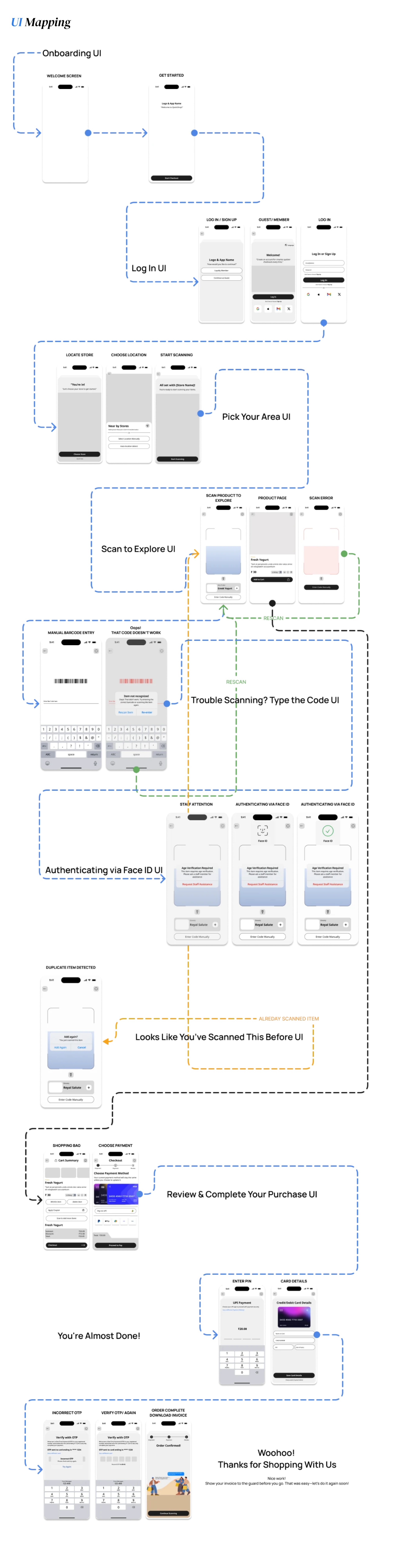
The full Grab & Go UI map — every screen and state across the journey, labeled by stage: onboarding, login, store selection, scanning, error recovery, Face ID, duplicate detection, payment, and invoice
Every screen and state across the journey: onboarding, login, store selection, scanning, error recovery, Face ID, duplicate detection, payment, and invoice.
Open image full size ↗

High-fidelity screens, annotated

02
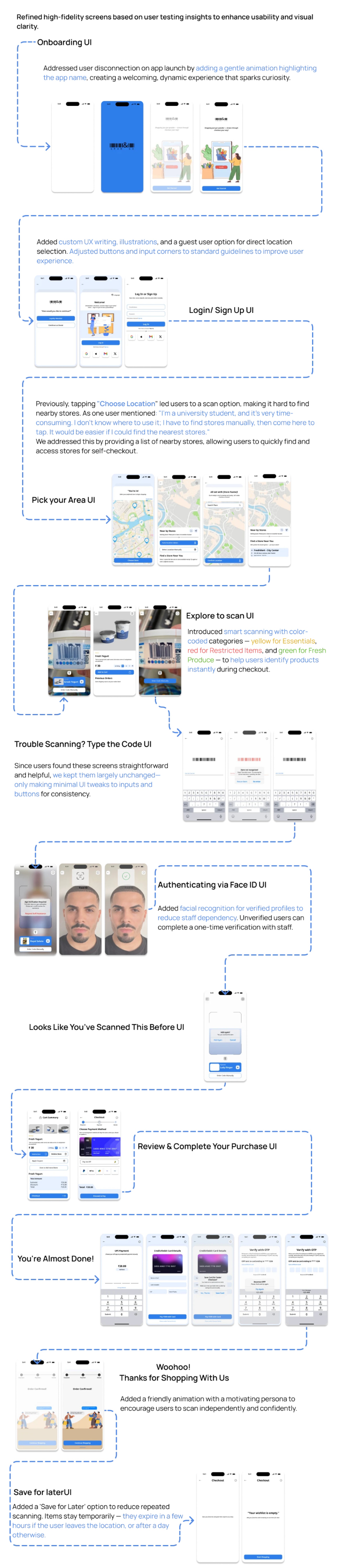
High-fidelity Grab & Go screens annotated with the design reasoning — color-coded scanning, guest location selection, facial recognition, and save-for-later with time-based expiry
Refined through user testing: color-coded scanning (essentials, restricted, fresh produce), guest location selection, facial recognition to reduce staff dependency, and save-for-later with time-based expiry.
Open image full size ↗
← Back to Grab & Go Appendix to the Grab & Go case study